
GitHub release automation with AI agents and approval
GitHub release automation can save time without giving AI agents unchecked publishing power. Use drafts, scoped actions, confirmation, and audit trails.
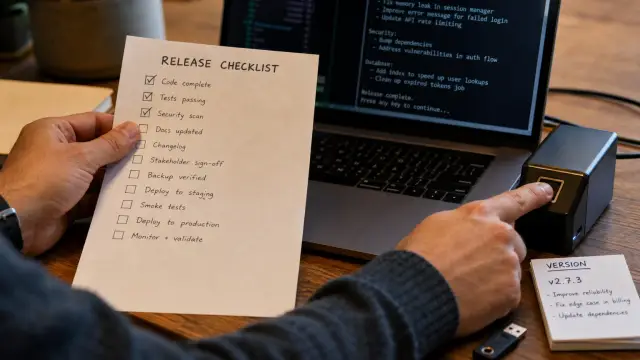
Release automation should remove clerical work, not hand a coding agent the authority to distribute software whenever it feels finished. An agent can collect changes, calculate a version, build a release candidate, draft notes, and assemble assets. Publishing and rollback need a person to inspect a concrete release request and approve that one action.
That boundary sounds conservative until you have cleaned up a release that carried the wrong binary, a moved tag, or notes that promised a fix that never shipped. The API call is easy. Reversing the consequences is usually not.
Give the agent a release workbench, not repository ownership
A release agent should have a small, explicit operation set that matches the work you want it to do. Broad repository write access feels convenient because it avoids designing an interface. It also lets a mistaken instruction turn a release task into tag deletion, branch mutation, workflow edits, or a public announcement.
For GitHub release automation, I separate preparation from distribution. The agent may read repository metadata, inspect commits in an approved range, run the build, calculate artifact hashes, create or update a draft release, and upload assets to that draft. It may not publish a release, delete one, alter a tag, modify repository settings, create tokens, or invoke an arbitrary GitHub endpoint.
Write the allowed actions as verbs with fixed inputs. This is more useful than telling an agent to "be careful."
inspect_release_range(base_tag, head_sha)returns commits and pull requestsbuild_candidate(head_sha)returns artifacts and SHA-256 digestscreate_draft(version, target_sha, notes)returns a draft identifierupload_asset(draft_id, filename, digest)uploads one verified filerequest_publish(draft_id)creates an approval request
The final verb matters. request_publish must not quietly publish if nobody responds. It should return a pending state that the caller can display and poll. A release workflow that treats a timeout as consent has already defeated its own control.
Avoid an escape hatch such as github_api(method, path, body). Teams add it for the odd operation that did not fit their first design. The agent will eventually use it because language models prefer the shortest path through an interface. Every unrestricted request method turns your narrow authority back into a general repository token.
The same rule applies to shell access. Do not expose gh with arbitrary arguments and call that a release interface. Wrap the specific operations you accept, validate their arguments, and reject everything else. If you need a new action next month, add it deliberately, test it, and decide where confirmation belongs.
A draft release is a review object, not a published release
A GitHub draft release lets you assemble the public record without making it public. That distinction gives the reviewer something real to examine: version, target commit, generated notes, attached files, checksums, and pre-release status. A message saying "ready to publish v2.4.0" is not enough evidence.
GitHub's REST documentation distinguishes creating a release with draft: true from publishing it by changing the draft state. GitHub also documents that make_latest affects which release GitHub presents as latest. Those fields may look like ordinary metadata, but they affect users and tooling. Treat them as publication choices rather than defaults an agent should infer.
A sound request includes immutable identifiers. The version string is useful for people, but the commit SHA identifies the source you actually reviewed. The asset digest identifies the file you actually built. If the request only says "publish v2.4.0," the reviewer has to reconstruct the release while an impatient agent waits.
Use a structured approval record like this:
{
  "operation": "publish_release",
  "repository": "acme/widgets",
  "draft_id": "123456",
  "version": "v2.4.0",
  "target_sha": "8b0c5f7c2d6c4e1a9f1a3b0e5e92d7a4c6f80c11",
  "prerelease": false,
  "make_latest": "true",
  "assets": [
    {"name": "widgets-v2.4.0.tar.gz", "sha256": "b3e1..."},
    {"name": "widgets-v2.4.0.tar.gz.sha256", "sha256": "f18a..."}
  ],
  "notes_digest": "c921..."
}
The approver should open the draft and compare this record with the repository state. The digest of the notes may sound excessive until someone edits a draft after review. You do not need to make every comma sacred, but you do need to know whether the artifact list, target, or release classification changed.
A draft is not harmless by default. It may be visible to users with repository access and it can trigger internal tooling. Keep draft creation in the lower-risk set only if your own environment treats it as review material. If draft assets flow into a package registry or an artifact mirror, require approval before upload as well.
Bind the version to a commit and the artifacts to the version
The most common release failure is not a malicious agent. It is a release whose version, tag, source commit, and binary came from different moments in a moving repository.
A clean process picks an immutable commit SHA first. The build runs from that SHA, not from a branch name. The agent records digests after the build completes. Only then does it create a tag and a draft that both point at the same SHA. If your release process requires a signed tag, the signing identity should operate outside the agent process just as the publishing credential does.
Do not let the agent use a mutable reference such as main as the target for a public release. A build can start at one revision while another merge advances the branch before the agent creates the release. GitHub will happily attach a release to the later target if your code asks it to resolve main at that time. The resulting notes may describe one revision and the artifact another.
Check the relationship before the approval prompt. A simple local verification can fail early:
git fetch --tags origin
git rev-parse "v2.4.0^{}"
git rev-parse HEAD
shasum -a 256 dist/widgets-v2.4.0.tar.gz
The first two object IDs must match after the tag exists, and HEAD must be the reviewed SHA if you built in that checkout. The checksum command produces a line shaped like this:
b3e1f2... dist/widgets-v2.4.0.tar.gz
Feed that exact digest into the approval record. Do not ask the reviewer to trust a filename. A file named widgets-v2.4.0.tar.gz can contain a debug build, an old build, or a binary from another architecture.
GitHub Actions documentation warns that pull_request_target runs in the context of the base repository and can expose write permissions or secrets to untrusted pull request code if used carelessly. The same lesson applies to a release agent: do not build a distributable artifact from untrusted code in a job that can publish. Separate untrusted validation from the controlled build that receives release authority.
Version calculation also needs a fixed rule. An agent may propose a version from conventional commits or merged labels, but proposal is not proof. A maintainer should decide how breaking changes, reverted changes, and release branches affect versioning. Automated semantic versioning fails quietly when the repository has inconsistent commit discipline.
Generated release notes need a human editor
An agent can turn merged pull requests into a credible first draft. It cannot know whether a migration deserves a warning, whether a contributor wants credit, or whether a behavior change breaks a use case that never appeared in a commit title.
Ask it to produce notes in sections that expose uncertainty. Put user-facing changes first, then fixes, then internal work. Include pull request references and the commit range used. Mark claims that came from code inspection rather than a maintainer's description. This prevents a smooth paragraph from disguising a guess.
I reject the popular instruction "write polished release notes from git log." It is popular because it yields an immediate document. It is wrong because commit messages describe implementation intent, not necessarily shipped behavior. A commit called "fix auth" may repair a test fixture, change an error string, or close a serious defect. The release note needs the actual user impact.
Make the reviewer answer a few plain questions before publishing:
- Does the target commit contain every change claimed here?
- Did any removed or reverted pull request remain in the range?
- Do users need to change configuration, data, permissions, or clients?
- Does any security wording need review by the people who investigated it?
- Is this a pre-release, and should GitHub present it as latest?
Do not hand the agent a security advisory and ask it to paraphrase it for a public release. The reviewer must decide disclosure timing, affected versions, workarounds, and credit. An agent may format approved language, but it should not decide what becomes public.
Keep release notes and release artifacts coupled at review time. When a reviewer reads "adds ARM support," they should see the ARM artifact in the draft and its checksum in the approval request. This catches a class of embarrassments that separate documentation and build reviews miss.
Confirmation must occur at the irreversible boundary
A confirmation dialog that appears after publication only documents regret. Put the prompt immediately before the operation that changes distribution state, and show the exact request being authorized.
The approver needs enough context to spot a mismatch in seconds: repository, draft title, target SHA, asset names and digests, pre-release status, latest-release choice, and the process asking for approval. Do not bury the repository in a collapsed detail panel. A release for the wrong repository can be more damaging than a malformed note.
Use a distinct confirmation for these operations:
- publishing a draft release
- deleting or unpublishing a release
- deleting a release tag
- replacing an existing release asset
- changing a release from pre-release to stable, or marking it latest
This is a small list on purpose. Asking permission for every read and every artifact hash trains people to approve without looking. Requiring a decision at a public or destructive boundary preserves attention where it has a chance to matter.
Confirmation should bind to a request digest. If the agent changes the draft, adds an asset, or changes make_latest after approval, invalidate the approval and ask again. Do not reuse a previous click because the version string still matches.
Sallyport's per-session authorization can identify a new agent process before it performs any action, and its per-call controls can require a separate approval for a chosen credential use. That maps cleanly to release work: allow a reviewed agent run to prepare a draft, then require a per-call decision when it uses the publishing credential.
Do not confuse an approval with authentication. A code-signing identity or CI workload identity tells you which process asked. The confirmation says a human accepted this particular outward action. You need both records when a release goes wrong.
Keep credentials out of the agent's prompt and environment
An agent that holds a GitHub token directly can bypass your carefully designed approval interface with a curl command, a modified workflow file, or a tool call you forgot to restrict. Prompt instructions cannot close that gap.
Store the credential in a component that executes only the allowed operation. The agent submits a structured request. The component validates repository, verb, target reference, and asset constraints, obtains any required approval, injects the credential into the outbound request, and returns the result. The agent never receives the secret, even as a redacted placeholder.
Sallyport keeps API and SSH secrets in its encrypted vault and executes the HTTP or SSH action itself, so an MCP-capable agent need not hold the credential. Its vault gate denies actions while locked, which is the behavior you want during an unattended machine state rather than a token lingering in a shell environment.
Use a separate credential for releases. Limit it to the repositories where it has a job, and remove permission to administer organizations, manage webhooks, edit Actions settings, or write unrelated repositories. GitHub Apps often fit this better than a human's personal token because the installation and permissions have a narrower purpose. The exact choice depends on your repository setup, but a shared maintainer token is a poor release identity.
Do not paste a token into an agent instruction, a .env file, or a CI artifact. Redaction does not solve the problem. Once a process can read a secret, it can often encode it in an output field, a release body, a filename, or a request to another service. Prevention starts by never delivering the secret to that process.
Rollback is a corrective release decision, not a delete button
Deleting a GitHub release may remove a page, but it does not recall downloaded archives, cached metadata, cloned tags, mirrored source, or an automated deployment already triggered downstream. A release agent that treats delete as a clean undo will make a bad event harder to investigate.
Start a rollback request by classifying the failure. If the artifact is broken but harmless, publish a corrected release with a clear note and decide whether to mark the earlier release as pre-release or remove it from the latest position. If the artifact contains a secret, malicious code, or a serious vulnerability, stop distribution first, revoke affected credentials, contact users through the channels you operate, and preserve the evidence needed for investigation.
A human should approve rollback actions separately from publication because the consequences differ. The prompt should state what will change and what will remain visible. "Delete release v2.4.0" is weak. "Delete the public release record and assets for v2.4.0; tag v2.4.0 remains at SHA X; existing downloads cannot be recalled" tells the approver what they are actually authorizing.
Do not let an agent delete a tag to make its release notes look tidy. Tags are references that other builds and users may depend on. If you must replace a tag, preserve the old SHA in the incident record and communicate the change. Moving a published version tag makes later verification much harder.
The safer default is a corrective version. It creates a clean audit path, lets downstream tooling distinguish the fixed artifact, and avoids pretending the first release never happened. Deletion has a place for accidental publication before anyone could reasonably consume it, but that is an operational judgment, not an automatic cleanup task.
An audit trail must reconstruct the action, not the story around it
When someone asks who published a version, "the agent did it" is not an answer. You need to identify the agent process, the person who approved the action, the credential authority that executed it, the request values, and GitHub's response.
Record one event for the agent session and one event for each release operation. The session record answers who started the run and when it lost authority. The action record answers which endpoint-equivalent operation occurred and with what resolved values. Keep secrets out of both.
For a publication event, capture at least the repository, draft identifier, release identifier, version, target SHA, source ref supplied by the agent, asset names and digests, release flags, note digest, decision time, approving identity, process identity, result code, and response identifier. Include failures. A denied request is evidence that a boundary worked.
Sallyport projects session and activity journals from a write-blind encrypted, hash-chained audit log. Its sp audit verify command checks the chain offline over ciphertext without needing a vault secret. That property is useful for release evidence because an auditor can check whether records were altered without receiving the credential material.
Logs do not replace controls. A perfect log that records an agent publishing the wrong package gives you a clean postmortem and a bad release. The log earns its place when you pair it with narrow actions, fixed identifiers, and an approval that cannot survive a changed request.
A release gate should fail closed when facts drift
The release gate should reject ambiguity instead of asking the approver to compensate for it. If the draft target differs from the reviewed SHA, if an asset digest differs from the build manifest, if the draft no longer exists, or if the release request has changed since approval, stop and create a new request.
This behavior can feel fussy during a release rush. It is cheaper than sorting out whether a tag moved between build and publish, or whether an agent uploaded a rebuilt file after the reviewer checked the old one. Release work benefits from a little friction at exactly this point.
Test the gate with deliberate failure cases before trusting it with a stable release. Ask the agent to publish a draft with a mismatched SHA. Upload an asset whose bytes change after checksum calculation. Change a draft title after approval. Attempt to delete a release through the preparation interface. Each attempt should fail with a specific record that tells an operator why.
Then make one operational rule that people can remember: the agent prepares a named release candidate, and a human approves the exact public change. If your current automation cannot state the repository, commit, artifacts, and rollback effect at that moment, it is not ready to publish unattended software.
FAQ
Can an AI agent publish GitHub releases safely?
An agent can safely prepare a release only when its authority is narrower than the release process. Let it inspect the repository, draft notes, create a draft release, and upload named artifacts. Keep publication, rollback, token creation, repository settings, and production credential changes behind a human confirmation.
Should an AI agent create a draft release or publish it directly?
A draft release is a review object, while a published release is a public distribution event. A draft can contain a bad title or incomplete notes without changing what users receive. Publishing sends the tag, notes, and assets into the release channel where package managers, deployment jobs, and users may act on them.
Is a GitHub token enough approval for release automation?
No. A GitHub Personal Access Token or app installation token expresses permission, not intent for this specific release. A separate approval at the publishing boundary checks the repository, version, artifacts, and actor before an irreversible action occurs.
What GitHub permissions does a release agent need?
Use a dedicated release identity whose scope permits only the repositories it must handle. Restrict the workflow so the agent can call only a defined release interface, then keep the credential outside the agent context. Do not give a coding agent a broad token merely because it can also write code.
Can I safely delete a bad GitHub release?
Rolling back a GitHub release does not reliably undo distribution. People may already have downloaded the archive, copied the commit, or triggered automation from the release. Prefer a corrective release, clear release notes, and revoked or replaced artifacts; reserve deletion for the rare case where you understand the downstream effect.
Which release operations should require human confirmation?
Require confirmation for any action that makes a release public, changes the target tag, replaces an asset, deletes a release, deletes a tag, or creates a new credential. Preparation actions can run without a prompt if you log them and constrain their inputs. The dividing line is public impact and recovery cost, not whether the API call uses POST or DELETE.
How do I prevent an agent from releasing the wrong commit?
Treat the commit SHA as the release identity and build artifacts from that exact commit in a controlled build job. Record checksums and validate them before publication. A tag name alone is weak evidence because someone can move or recreate it unless your controls prevent that change.
Can AI-generated release notes be trusted?
No. An automated changelog is a draft written from commit messages and pull request metadata, which are often incomplete or misleading. A maintainer should check breaking changes, migration instructions, acknowledgments, security wording, and whether unreleased work slipped into the range.
What should an audit trail for AI release automation contain?
Logs must record both the agent run and each action it requested, including the resolved repository, version, commit SHA, artifact digests, result, and approving identity where applicable. Store enough evidence to reconstruct the decision without keeping secret values. A text transcript alone is weak because it can omit the actual API request.
How do I keep GitHub credentials out of an AI agent?
A release agent needs credentials, but the agent process should not receive them as environment variables, prompt text, or configuration files. Put the credential holder behind an action gateway that performs the approved request and returns the response. This also makes it possible to require a per-call confirmation for publication and deletion.