
MCP process trees: find unexpected child processes
Learn how to inspect MCP process trees on macOS, spot unexpected child processes, trace sockets, and contain risky local agent execution.
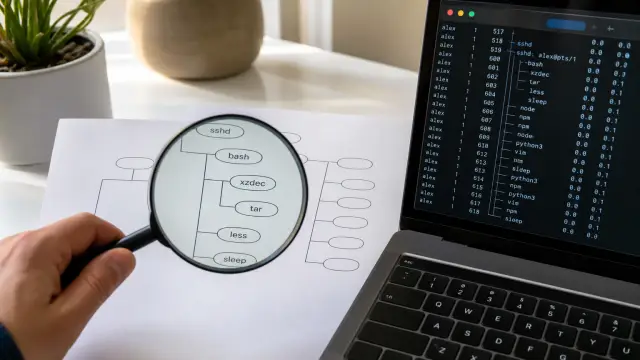
Local MCP servers make it easy to mistake a clean protocol boundary for a clean execution boundary. An agent sends a tool call, the server returns a result, and the transcript looks contained. Meanwhile the server may start a shell, a package runner, a language runtime, a compiler, an SSH client, or a helper downloaded into a project directory. The process tree tells you where the work actually went.
I do not treat an MCP server as one process for review purposes. I treat the server and every descendant it starts as one execution family until those descendants exit. That rule catches the failures that tool transcripts routinely miss: an argument that caused a shell to invoke something else, a helper selected through PATH, a child that retained an API token, or a long-lived program that opened a socket after the original request appeared finished.
A tool call can become many local programs
An MCP server often starts children for ordinary reasons. A repository tool may call git; a code tool may invoke a formatter; an infrastructure tool may call ssh; a package-aware server may start a runtime and then a package executable. The existence of a child does not establish a breach.
The useful distinction is between an expected helper and an unaccounted execution path. An expected helper has a documented job, a known executable location, arguments that fit the request, and a lifetime that fits the job. An unaccounted path breaks one of those assumptions. It may still be harmless, but it deserves an explanation before it receives a credential, filesystem access, or network reachability.
A parent PID alone is not enough. Unix process creation creates a lineage, not a security contract. A descendant commonly inherits the parent's user ID, current working directory, environment variables, resource limits, and sometimes open file descriptors. The exact inheritance depends on how the parent starts it, but a child has usually received enough context to act as the parent in places that matter.
That is why "the MCP server only calls one command" is not a useful assurance. tool-server might start /bin/sh -c, which starts node, which starts a package script, which starts curl. A reviewer who records only tool-server has documented the least interesting part of the chain.
The POSIX exec model explains the sharp edge. A process can replace its image with another program without changing PID. A simple process list taken before and after a request can therefore miss a short-lived intermediary. You need both a tree view and event evidence when the task has enough sensitivity to warrant it.
Establish a baseline before you let an agent work
A baseline is a record of the children your server starts during a boring, approved request. It gives later observations a comparison point. Without it, every interpreter looks suspicious and every warning turns into an argument about what might be normal.
Start the server manually in a dedicated Terminal session. Record its PID immediately, then capture the process table with full command lines:
ps -axo pid,ppid,user,etime,stat,command > mcp-process-baseline.txt
The columns matter. PID identifies the process, PPID identifies its direct parent, USER shows which account owns it, ETIME gives elapsed runtime, and STAT can reveal a stopped or zombie process. COMMAND is only as complete as the operating system can report, but it is still the first place to look for a shell wrapper, a temporary path, or an unexpected flag.
On macOS, ps does not ship with a universally available tree display. You can enumerate direct children with pgrep:
pgrep -P 48192 -alf
Replace 48192 with the server PID. Typical output has the form:
48207 /usr/bin/python3 /Users/me/tools/format_request.py
48211 /usr/bin/ssh -o BatchMode=yes build.example
Then repeat the command for every child PID until no new descendants appear. That sounds tedious, and for a one-off review it is. It also forces you to see the actual chain rather than trusting a diagram in documentation. If you install pstree through your normal package process, pstree -p 48192 gives a more readable snapshot. Do not make the display tool part of the security claim. It merely saves typing.
Run a small set of expected requests: a read-only repository query, the formatter action, an SSH action if the server supports one. Save a snapshot for each. Note the executable paths, normal arguments, normal working directories, and whether helpers exit. A compiler that appears for a build request may be expected. The same compiler during a request to summarize a text file is a deviation.
Do not baseline against a development checkout full of mutable wrappers and package scripts, then call the result trusted. That setup tells you what your current machine happens to run. It does not tell you what the server should be permitted to run. Write down the expected executable paths separately.
Shell wrappers hide the process you meant to inspect
Shell invocation is popular because it makes dynamic commands easy to assemble. It also turns an argument boundary into text, and text can acquire meaning through quoting, expansion, globbing, redirects, command substitution, and shell functions. The server author may intend to run a formatter while the actual child process launches a shell that decides what the formatter command means.
This is a frequent source of misleading reviews. Someone sees an allowlisted binary name in source code, then assumes that binary is the one executed. The runtime evidence shows /bin/sh -c ..., and the shell resolves the rest later. Those are different claims.
Compare these two patterns in a server implementation:
spawn("/usr/bin/git", ["status", "--short"], {
  cwd: repositoryPath,
  shell: false
});
exec(`git -C ${repositoryPath} status --short`);
The first pattern keeps the executable and arguments separate. It still needs validation of repositoryPath, but it avoids shell parsing. The second pattern gives repositoryPath a chance to change the command grammar if the code gets quoting wrong. It also adds a shell process to the tree, which may spawn more processes before the final command starts.
Do not accept "we sanitize input" as a substitute for an argument vector. Sanitizers decay as options grow. Developers add a feature, permit spaces, add a conditional flag, and the old filter no longer describes the command grammar. An explicit executable plus an array of arguments makes the boundary visible in code and in audit output.
If a server genuinely needs shell syntax, narrow it. Use a fixed script stored outside the agent-writable workspace, pass data through positional parameters, and record the script's path and digest in your deployment notes. Never compose a shell line from tool input and call the resulting child expected just because it originated in your source tree.
The awkward case is package tooling. Commands such as package runners often execute lifecycle scripts supplied by the project. A server that runs a package command inside an agent-edited checkout may therefore launch commands the agent placed in the project configuration. That is not a package manager defect. It is an execution decision you made by treating a mutable repository as a source of trusted instructions.
PATH and working directories change the meaning of a command
git is not an executable identity. It is a lookup request. The process resolves it by searching PATH, and an agent-controlled repository can influence that search if the server includes project-local directories or inherited shell configuration. A file named git in such a directory can run before /usr/bin/git.
Inspect the environment that a process receives, not just the command shown in a tool transcript. For a process you own, macOS lets you query environment information through ps on many versions, though availability varies. A practical approach is to have the server log a deliberately short, redacted environment at startup: PATH, HOME, TMPDIR, current directory, and the paths of fixed executables. Do not log access tokens, session cookies, or complete environment dumps into a shared project log.
Resolve sensitive commands to absolute paths. This is not ceremony when an agent can alter the working tree. For example:
/usr/bin/git -C /Users/me/work/repo status --short
/usr/bin/ssh -o BatchMode=yes -o IdentitiesOnly=yes host.example
Absolute paths remove one lookup problem. They do not make the target safe. git can invoke hooks or external diff programs under some configurations. SSH can load configuration and invoke helpers. The working directory also controls relative file reads, project configuration, and temporary outputs. Record it when you inspect a child.
Use lsof to examine a process's current directory and opened files:
lsof -nP -p 48207 | sed -n '1,35p'
Look for cwd in the file descriptor column, executable text under txt, and files under the project, temporary directories, or credential locations. lsof is a snapshot. A quick child can appear and vanish before you run it, but the output is still good at catching a server that quietly keeps a helper alive.
A child launched from /private/var/folders/... needs more scrutiny than one launched from a managed application directory, particularly if its name resembles a normal utility. Temporary locations are legitimate places for build products. They are also convenient places for a process to hide among disposable files. Ask which component created it and why that component needed an executable there.
Network activity must fit the requested action
A local child can reach past the boundary of the MCP request even when it never writes a suspicious file. A formatter should not usually open an outbound connection. An SSH helper should connect to the requested host and then exit. A package installation may contact registries, but that action needs explicit review because it can fetch and execute new code.
Inspect sockets for the server and every child that persists long enough:
lsof -nP -i -p 48211
The output typically includes protocol, local address, remote address, and connection state. The -nP flags prevent name and service lookups, which keeps the output literal and avoids extra resolver traffic during an investigation. A LISTEN entry means the process accepts local or network connections. An ESTABLISHED entry means it has an active peer. Match each entry against the action that caused it.
Do not overreact to every network library process. Some developer tools check update services, certificate status, or dependency metadata. I still treat that behavior as a reason to tighten the server. A tool call that supposedly reads local code should not acquire an undeclared outbound channel merely because a helper thinks it is convenient.
Separate credential injection from process observation. Process inspection can tell you that curl ran. It cannot guarantee that the token passed in an environment variable was never copied, logged, or inherited by a grandchild. A common recommendation is to "just put the API key in the child environment for one command." It is popular because it is easy and works in a demo. It is wrong for agent-run actions because a child can print its environment, pass it on, or remain alive after the visible command returns.
Sallyport takes a different boundary for its HTTP and SSH channels: the agent does not receive the stored API or SSH credential, and the app performs the action instead. That does not remove the need to inspect local MCP children, but it avoids turning every helper process into a potential holder of the secret.
A failure often starts with a reasonable convenience wrapper
Consider a local repository MCP server that offers a run_test tool. The author wants a flexible command, so the handler changes into the repository and runs a project-defined test script through a package command. The agent has permission to edit the checkout because editing code is the job.
The agent changes the project script as part of a proposed fix. The server runs the test tool. The package command starts a shell, which starts the runtime, which runs the modified script. That script starts a background helper with output redirected to a temporary file. The tool returns "tests passed" because the foreground command exits successfully.
Nothing in that sequence requires an exotic exploit. The problem is that the server treated agent-writable project metadata as approved executable configuration. A reviewer may see only the original MCP request and the success result. The process tree shows the meaningful story:
mcp-repo-server(48192)
  package-runner(48230)
    sh(48233)
      runtime(48234)
        test-script(48240)
          helper(48247)
The background helper is the investigation point. Check its full command line, executable path, parent chain, working directory, open files, sockets, and start time. Check whether it survives after the server session exits. Then inspect the project change that supplied the script. Do not frame this as an agent failure alone. The server offered execution over mutable instructions and called the result a test.
The repair depends on the intended product behavior. A cautious server can run a fixed test executable with fixed arguments. If project-defined scripts are necessary, treat the script file and package metadata as executable inputs: show them for approval, run them in a constrained environment, and prohibit backgrounding where possible. At minimum, the server must report every descendant it started, including one that outlives the tool call.
The important distinction is between an agent asking a server to execute a known test command and an agent changing what the test command means before the server executes it. Both may appear as run_test in an MCP transcript. They present very different risk.
Observe process births, not only snapshots
Snapshots answer "what is alive now?" They do not answer "what ran for 200 milliseconds and exited?" For suspicious or sensitive tool calls, observe process births while the request runs.
macOS includes Endpoint Security for security products with the required entitlement, but ordinary local tooling cannot assume it. Do not write a design that depends on privileged event collection unless you actually ship and operate that capability. For a developer investigation, use a controlled wrapper around the executable and collect start and exit details, or run the server under a process monitor available in your environment.
A simple wrapper can make execution visible when you control the server's command path:
#!/bin/sh
printf '%s pid=%s ppid=%s cwd=%s argv=%s\n' \
  "$(date -u +%Y-%m-%dT%H:%M:%SZ)" "$$" "$PPID" "$(pwd)" "$*" \
  >> "$HOME/.local/state/mcp-exec.log"
exec /usr/bin/git "$@"
This artifact records the wrapper's identity and then uses exec to replace the wrapper with git. It prevents the wrapper from lingering as an irrelevant parent. It does not capture every descendant that git might create, and it must not receive secrets in arguments. Use it to test a controlled hypothesis, not as a complete audit system.
For an existing process, macOS dtruss can reveal system calls but often requires elevated privileges and produces a great deal of output. It is an investigation tool, not routine monitoring. Start with the process tree, lsof, and application logs. Reach for syscall tracing when you need to answer a specific question, such as whether a child executed another path or connected to a socket.
Keep timestamps in UTC and record the parent PID with every event. A command line without a parent and time is weak evidence. PID values are reused after processes exit, so a late snapshot can accidentally attach a new, unrelated process to an old incident. The process start time in ps or your own event log helps avoid that mistake.
Approval must name the executable boundary
A confirmation that says "Allow run_test?" gives a human too little information. The person approving needs to know which signed process initiated the action, which executable will run, the working directory, whether the action can reach the network, and whether it can start further programs. A vague approval card teaches people to approve vague actions.
Do not try to solve this by prompting for every fork call. That creates approval fatigue, then users approve mechanically or turn prompts off. Review the meaningful transitions: a new executable path, a transition from local work to network access, a command sourced from a mutable project file, or a child that persists past the request.
Code signing information gives a useful identity signal on macOS, but do not oversell it. Inspect an executable with:
codesign -dv --verbose=4 /path/to/executable 2>&1 | sed -n '1,20p'
The command reports signing authority when present and reports an error for unsigned code. That tells you who signed the file macOS inspected. It does not tell you whether the command arguments are safe, whether its configuration is trustworthy, or whether it will execute an unsigned script afterward. Inspect the child path and its execution context separately.
Sallyport's session authorization leads with the connecting process's code-signing authority, which is useful for deciding whether a new agent process may act at all. Its per-call key setting fits the narrower case where a particular credential use needs a human decision every time. Neither control should be used to pretend that an approval of a parent automatically explains every descendant it may create.
Build approval language around consequences. "This request will run /usr/bin/ssh as your account and connect to host.example" is reviewable. "This tool needs access" is not. If the tool can invoke project scripts, say that directly. Humans can make informed decisions when the request has a concrete shape.
Contain the server before you investigate the child
When you find an unexpected child, preserve enough evidence to explain it, then stop the execution family. Do not begin by deleting temporary files or rebooting. Those actions may remove the only path, command line, and timing evidence you have.
Use this order when the child is still running:
- Capture
psoutput for the server, its parent, and known descendants. Record PIDs, PPIDs, elapsed time, and full commands. - Run
lsof -nP -p <pid>andlsof -nP -i -p <pid>for the suspicious process. Save the output outside the agent workspace. - Stop the suspicious descendant with
kill <pid>if a normal termination is safe. Escalate tokill -KILL <pid>only if it will not exit and continued execution creates unacceptable risk. - Stop the MCP server and revoke or end the agent session that initiated the action. Check for children that were reparented after the server exited.
- Inspect the executable, its launch source, and changes to the repository or configuration that produced the command.
kill does not automatically terminate a process group or all children. A backgrounded descendant can continue after its direct parent exits. This is why you need the tree before cleanup. On a controlled server, place helpers in a dedicated process group or supervision scope so that the server can terminate the group on session end. Test that behavior with a deliberately backgrounded helper before relying on it.
Also check persistence. On macOS, launchctl print can inspect loaded launch services when you have a specific label or domain to examine. Do not blindly unload unrelated jobs because their names look unfamiliar. Match a suspected child to its executable path, launch configuration, and timestamps first. A process that returns after a clean reboot or fresh server start needs a different investigation than one that existed only in a test session.
Make every action explainable after the fact
A useful audit record connects a user-approved agent process to a request, an executed action, and its observed result. Process telemetry should add the executable path, parent chain, working directory, start and exit time, and destination for network activity. If the record lacks the process tree, it cannot answer whether a helper was part of the request or an unrelated machine process.
Do not put secrets into audit records to make them complete. Store credential names or opaque identifiers, request metadata that reviewers need, and the action result after redaction. A log that solves provenance by copying bearer tokens has created a second credential store with weaker controls.
Tamper evidence matters after an incident because local logs can be edited by the same account that ran the command. Sallyport projects both its Sessions and Activity journals from an encrypted, hash-chained audit log, and sp audit verify checks that chain offline without a vault key. That is useful evidence for an agent action, but the process records still need enough context to explain what the local server started.
Put one review question into your server's operating procedure: "Which executable did this request cause to run, and why was that executable allowed to exist in this working directory?" If nobody can answer it from a request record and a process capture, reduce the tool's scope. A local MCP server that cannot account for its descendants has more authority than its operators can safely review.
FAQ
How do I see all child processes started by an MCP server on macOS?
Start with ps -axo pid,ppid,user,etime,command and locate the server's PID. Then run pgrep -P <pid> for direct children and use pstree -p <pid> if you have installed it. Inspect the whole descendant tree, because the risky process is often a grandchild started by a shell.
Do MCP child processes inherit the MCP server's permissions?
A child process does not inherit its parent's permissions in a simple, universal way, but it often inherits the same user identity, current directory, environment, open file descriptors, and access to reachable local services. That is enough to create damage when the parent has broad access. Treat every descendant as code running inside the agent's operational boundary.
Can a signed MCP server launch an unsigned child process?
No. A signed parent can start an unsigned script, an interpreter, or a binary from a writable directory. Record signing authority for each executable that matters, not only for the top-level server.
How can I check whether an MCP child process opened a network connection?
Use lsof -nP -i -p <pid> for a process and repeat it for suspicious descendants. The output tells you whether a process has listening sockets or outbound connections, and avoids DNS lookups that can obscure timing. A network connection is not automatically malicious, but it must match the task and the expected destination.
Is it safe for an MCP server to use a shell to run commands?
A shell is not automatically unsafe, but it removes much of the visible structure that makes review possible. It can expand variables, run command substitutions, change directories, and invoke another shell before it starts the actual program. Use an explicit executable and argument list when you can, and inspect shell-launched descendants when you cannot.
Why is PATH risky for local MCP servers?
No. PATH can select a different executable than the author expected, especially when an agent-controlled directory appears first. Log the resolved path, use absolute paths for sensitive commands, and keep writable project directories out of the service's PATH.
What should I do if an MCP server starts an unexpected process?
Kill the descendant first if you can identify it, then stop the MCP server and revoke the agent session that started it. Preserve the command line, parent PID, open files, network sockets, and relevant logs before cleanup. Restarting first often destroys the evidence needed to explain what happened.
Can process tree monitoring prevent credential theft?
Process inspection shows what ran and which parent started it. It does not prove that the program behaved correctly, nor does it protect a credential that the server already placed in the child environment. Pair inspection with narrow credentials and an action boundary that keeps secrets out of agent-controlled processes.
How often should I audit MCP process trees?
Watching every process all day produces more noise than assurance. Capture a baseline at server startup, inspect each new executable or network-facing child, and investigate deviations during sensitive work. That gives reviewers a short list they can actually read.
What counts as an unexpected child process in an MCP setup?
A child process is expected when the server's documented job requires a helper such as a language runtime, compiler, formatter, or SSH client. It becomes suspicious when its executable, arguments, working directory, duration, or network behavior does not fit that job. Context matters more than whether the process has an unfamiliar name.