
Sudo access for AI agents: control every elevation
Sudo access for AI agents needs narrow approvals, accountable reasons, constrained helpers, and audit records that survive the agent session.
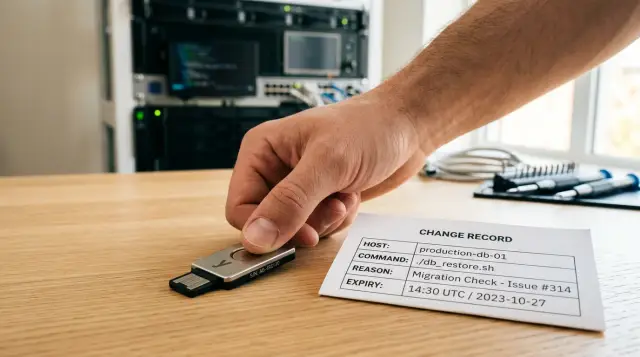
Giving an AI agent sudo because it can already open a remote shell is a category error. Remote execution answers "can it reach this machine?" Elevation answers "may this request alter protected state?" Those decisions need different evidence, different controls, and different records.
I have watched teams collapse them into one convenience feature: an agent connects over SSH, runs sudo, and leaves a chat transcript behind. It feels tidy until a bad command restarts the wrong service, replaces a configuration file, or follows an instruction hidden in a repository. Then nobody can say which process held authority, who approved it, or why root access appeared necessary.
sudo access for AI agents should mean a narrow, attributable exception for a stated operation. It should never mean that the agent has acquired an administrator's ambient power for the rest of a task.
A remote shell and sudo answer different questions
An SSH session proves that some client authenticated to a remote account. It does not establish that every command typed or generated in that session deserves root authority. Keep the ordinary account useful enough for discovery, builds, tests, log reading, and deployment preparation. Put the small set of protected changes behind a separate elevation path.
This distinction gets blurred because the shell makes privilege escalation look like a syntax detail:
ssh deploy@api-02 'sudo systemctl restart payment-worker'
That one line hides at least five decisions: which agent process issued it, which host it targeted, whether the service name is correct, why a restart is needed, and whether a person accepted the consequence. SSH can authenticate the connection. sudo can switch the effective user. Neither tool, by itself, captures the reason or provides a decision point that fits autonomous work.
Ordinary remote commands should remain ordinary. An agent can run systemctl status, inspect a service log it already has permission to read, compare a rendered configuration, or execute a health check without asking for root. That separation has a practical benefit: the agent can collect evidence before it asks anyone to approve a change.
Do not overcorrect and put every shell command behind a human prompt. That creates approval fatigue, and people start clicking through cards they no longer read. Put the friction where an action changes a protected boundary: service management, system package changes, privileged file writes, account changes, network rules, secret material, boot settings, and production data operations.
A command's spelling does not determine its risk. sudo cat /var/log/... may expose sensitive content. sudo systemctl restart ... may interrupt a customer-facing service. A seemingly harmless sudo install can replace an executable. Classify the effect, the target, and whether the arguments permit an escape into arbitrary root behavior.
Sudoers rules are allowlists, not a safety argument
The sudoers manual says that sudo determines whether a user may run a command based on the command path and, where configured, command-line arguments. That is useful machinery, but it does not turn a broad allowlist into safe delegation.
A rule such as this delegates far more than many people intend:
autobot ALL=(root) NOPASSWD: /usr/bin/systemctl *
It permits the account to start, stop, restart, enable, disable, mask, and inspect any unit the local systemctl supports. An agent that can influence a unit file, an environment file, or a service's executable may turn a permitted restart into code execution as root. The rule also has no place for a change reason or an expiry.
Argument restrictions help only when the permitted program has a small, stable interface and cannot interpret attacker-controlled input as a path, shell expression, plugin, editor, pager, or configuration source. Administrators often miss this because the command looks familiar. A command does not become narrow merely because its binary path is absolute.
Prefer a purpose-built wrapper with a fixed operation and explicit validation. For example, a restart wrapper can accept a hard-coded service name rather than arbitrary systemctl arguments:
#!/bin/sh
set -eu

case "${1:-}" in
  payment-worker|report-worker) ;;
  *) echo "unsupported service" >&2; exit 64 ;;
esac

exec /usr/bin/systemctl restart "$1"
Then restrict sudo to that wrapper and exact arguments where the platform supports it:
autobot ALL=(root) /usr/local/sbin/restart-approved-service payment-worker, \
                    /usr/local/sbin/restart-approved-service report-worker
This prevents systemctl subcommand sprawl. It does not answer whether the restart makes sense at this moment. The wrapper also needs root ownership, non-writable parent directories, and protection from agent-controlled environment variables. If an agent can edit the wrapper or replace something it executes, the rule has failed.
Avoid the popular recommendation to "just use NOPASSWD for automation." People like it because unattended jobs stop failing on password prompts. The password prompt was never the meaningful control for an autonomous agent. Replacing it with unrestricted elevation only removes the last visible pause. Replace it with specific authorization and an accountable record, not empty convenience.
An elevation request needs a reason that a reviewer can judge
A reason is part of the authorization decision, not a decorative sentence copied into a ticket after the fact. The agent should create the request before elevation, and the approval surface should show the proposed operation alongside that reason.
Require the request to bind together these fields:
- The exact target, such as
api-02andpayment-worker. - The requested privileged operation, including fixed arguments.
- The reason, tied to an incident, deployment, maintenance task, or observed condition.
- The expected effect and a rollback action.
- An expiry short enough that an abandoned request cannot become standing authority.
The reason must contain evidence a human can assess. "Need sudo to fix the build" means the agent has not yet done enough diagnosis. "Replace /etc/acme/client.conf with the reviewed release configuration after the current certificate renewal reports a parse error; restore the prior version if validation fails" identifies a file, a condition, and a recovery path.
Keep the request structured even if you also retain a free-text explanation. Structured fields make it hard for an agent to quietly shift the target between planning and execution. They also make later review possible without asking someone to reconstruct a decision from several chat windows.
Use an immutable request identifier. The approval should authorize that identifier, the specified target, and the specified operation. Do not approve a natural-language instruction such as "handle the outage" and let the agent decide later what root commands fall under it. That turns a human approval into an unlimited blank check.
A useful request record can look like this:
{
  "request_id": "elev-7f4c2",
  "agent_session": "run-91b0",
  "host": "api-02",
  "operation": "/usr/local/sbin/restart-approved-service payment-worker",
  "reason": "Deployment 482 left payment-worker unhealthy; status shows repeated configuration parse errors.",
  "expected_effect": "Service restarts with the reviewed configuration.",
  "rollback": "Restore the previous configuration revision and restart the service.",
  "expires_at": "2025-03-08T14:25:00Z"
}
The execution record should carry request_id back with it. Without that binding, an approver may have accepted one operation while the agent performed another.
The agent process needs its own identity
A shared deploy account makes every actor look the same after the damage is done. Give the agent run an identity that records which executable started it, which human or service initiated it, which repository and task it received, and when its authority ends.
Human identity and process identity are separate facts. A developer may start an agent, but the agent's process issues the command hours later after it has read files, tool output, and network responses. The audit trail should preserve both facts. "Jamie initiated run 91b0" and "signed agent process 91b0 requested elevation" let an investigator distinguish sponsorship from execution.
Code signing can help identify the local executable that asked for access. It cannot prove that the model's instruction was safe, nor can it make a compromised repository trustworthy. Treat process identity as a bound on who may request, not proof that the request is wise.
Do not let the agent receive a reusable root password, a private SSH credential that lands directly on an administrator account, or a long-lived sudo timestamp it can refresh indefinitely. Each one changes a narrow request into a portable capability. Once the agent can copy that capability into a workspace, log, build artifact, or child process, you have lost control of its spread.
Short-lived credentials reduce exposure but do not make a bad command good. Use expiry alongside a defined operation, a bound process, and a reason. If any of those are missing, you have an access token with a nicer label.
A root shell gives the agent too much room to reinterpret instructions
Never approve sudo -i, sudo su, sudo sh, or an unrestricted sudo bash for an agent session. A root shell authorizes every later command, including commands assembled from tool output that did not exist when anyone approved the first one.
The same warning applies to command forms that disguise an arbitrary interpreter:
sudo python3 -c "$AGENT_TEXT"
sudo env CONFIG="$AGENT_TEXT" /usr/local/sbin/apply-config
sudo tee /etc/some-file.conf
Each example looks limited until you inspect its input channel. Python executes arbitrary code. env can alter a program's behavior in ways the caller did not anticipate. tee gives a writer authority over an arbitrary root-owned path if the path remains unconstrained. A command policy that ignores arguments and environment is just a filename policy.
A better design separates diagnosis from execution. The agent can inspect the unprivileged facts, generate a proposed change, and submit it for review. A narrow privileged helper then receives only the approved inputs. The helper validates those inputs again because review-time validation and execution-time validation protect against different failures.
Consider a deployment agent that notices a service failure. Under broad sudo, it might edit a unit override, reload the manager, and restart the service. A malicious string in a repository-controlled configuration can become an ExecStart line, and the restart executes it with root authority. Under a constrained design, the agent may read status and prepare the reviewed configuration, but a privileged deploy helper only accepts a content digest from an approved artifact location. It rejects unit files, arbitrary paths, and unmanaged overrides.
That is more work than handing over a shell. It is also the difference between a known operation and an interpreter that can invent new operations after approval.
Approval must follow the risk of the operation
One approval for a session can make sense for routine, limited remote actions. It does not make sense for every use of an administrator capability. Treat session authorization and per-call authorization as distinct controls.
Session authorization answers: "May this identified agent process use ordinary remote channels for the duration of this run?" It prevents an unknown local process from silently impersonating a known agent. It should end when the process exits, and an operator should be able to revoke it immediately.
Per-call authorization answers: "May this specific action run now?" Put it on operations with a high blast radius, scarce credentials, production impact, or irreversible effects. The approval card should lead with the process identity, then show the target, operation, reason, expiry, and expected effect. Hiding the identity under a pile of prose defeats the point.
Do not force the operator to parse a hundred lines of generated shell. Give the agent a vocabulary of named operations with rendered details. "Restart payment worker on api-02" is reviewable. A shell blob with nested quoting makes the human rubber-stamp what they cannot understand.
The approval path also needs a refusal path that helps the agent recover. Return a clear denial and, where appropriate, an instruction such as "requires a deployment change record" or "this operation is unavailable on production." Do not let the agent retry with minor wording changes until a tired person accepts it. Denial should close the request unless a human creates a new one with materially different information.
For an emergency, retain the same discipline. An on-call engineer can approve a narrow request with a short expiry and an incident reference. The urgency may justify faster review; it does not justify deleting the record or granting an interactive root shell.
Audit records must survive the agent that created the request
A terminal transcript helps debugging, but it cannot carry the burden of an audit record. The agent can omit it, alter local files, or run commands through a path the transcript did not capture. Capture authorization and execution in a store the agent cannot rewrite.
Record the decision separately from the action. An approval record should show who approved, when they approved, the process identity, the exact request contents, and the expiry. An execution record should show whether the helper ran, what host it reached, what it returned, when it ended, and the request identifier that authorized it.
Include a result digest or bounded output summary rather than dumping sensitive command output into a broadly visible journal. The person investigating needs enough evidence to see that payment-worker restarted and became healthy. They do not need a copied database password that happened to appear in stderr.
Tamper evidence matters because audit logs become interesting after an incident. A hash chain links each record to the prior record. If someone changes or removes an entry, verification detects the discontinuity. Keep verification independent of the agent and, if possible, independent of the credentials used to execute actions. A log that needs the compromised administrator credential to verify is less useful when you need it most.
For example, an offline verifier should report a sequence shape like this:
$ sp audit verify --file agent-audit.enc
verified records: 184
chain start: 8c1a...e72d
chain end: 4bf0...193a
status: valid
The important property is not the command name. It is that the verifier can detect a changed ciphertext record without asking the agent to explain itself. Keep copies outside the machine where the agent works, because an attacker who controls that machine may delete the entire journal.
Sallyport follows this separation by keeping credentials out of the agent and projecting session and individual-action journals from a write-blind, encrypted hash-chained audit log. That model is useful when agents need HTTP or SSH actions but should never possess the credentials that authorize them.
Privileged helpers need narrow interfaces and hostile-input tests
A helper is security-sensitive code even if it has twenty lines. Test it as if every argument, environment variable, working directory, and referenced file came from an attacker, because an AI agent can be induced to pass hostile material without intending harm.
Start with an operation inventory. Write down each privileged effect the agent legitimately needs, such as restarting a specific service or installing a signed release artifact. If you cannot describe an effect without saying "run arbitrary command," the operation has not been designed yet.
For each helper, answer these questions before putting it into sudoers:
- Which exact inputs can the caller provide, and how does the helper validate each one?
- Which filesystem paths, executables, configuration files, and environment variables influence its behavior?
- Can any accepted input trigger a shell, interpreter, pager, editor, plugin loader, or network fetch?
- Does the helper verify ownership, permissions, and content identity before it acts?
- What record does it emit when validation fails as well as when execution succeeds?
Run negative tests, not only the happy path. Pass ../ path traversal, shell metacharacters, an empty service name, an oversized input, unexpected Unicode, and a valid name that points to an unsafe state. Try to replace a referenced file between validation and use. Check whether a writable log directory, temporary directory, or parent directory lets the agent redirect root output.
Also inspect dependencies after updates. A helper that was safe against one version of a command can become unsafe when a new option accepts a configuration path or loads an extension. Narrow interfaces reduce this maintenance burden, but they do not eliminate it.
Roll out elevation as a controlled exception
Begin by removing the most dangerous forms of ambient privilege: shared administrator accounts, unrestricted NOPASSWD, reusable root secrets in agent configuration, and root shells. You do not need to halt all automation before making that change. Preserve read-only diagnosis first, then move one protected operation at a time into an explicit helper and approval path.
Choose an operation that happens often enough to test the process but has a bounded rollback, such as restarting a named worker after a reviewed deployment. Require the agent to submit the host, reason, effect, rollback, and expiry. Make the approver reject vague requests. That friction teaches the agent workflow what evidence it must gather before it asks for power.
Review denied requests as seriously as successful ones. A cluster of requests for arbitrary file writes may show that the deployment interface lacks a needed operation. It may also show that the agent keeps attempting to bypass a boundary. Those are different problems, and an audit trail lets you tell them apart.
Then practice revocation. Kill a session while the agent is working, deny an already-issued request after its expiry, and verify that a copied request identifier cannot authorize a second action. Teams often test approval screens and skip this part. Revocation is the control you need when the agent starts behaving differently halfway through a run.
Do not measure maturity by the number of commands an agent can run as root. Measure it by whether every elevation remains narrow, attributable, time-bound, reviewable, and recoverable when the agent or its inputs go wrong.
FAQ
Can an AI coding agent safely use sudo?
No. A model can propose a command, but the operating system still needs an accountable principal to authorize it. Treat the agent as an untrusted request source and make a separate local control decide whether a privileged command may run.
What is the safest way to grant sudo to an AI agent?
The agent should request elevation only for an explicit, narrow operation after it has identified the target host, command, and reason. A human or a bounded local authority should approve that operation, and the system should record the resulting action.
What counts as a privileged operation for an agent?
A general remote command changes ordinary files or reads ordinary state under a limited account. A privileged operation crosses a boundary such as root ownership, system service control, package installation, firewall changes, or access to protected credentials.
Is NOPASSWD sudo acceptable for AI agents?
Usually, no. NOPASSWD removes the interactive friction but does not give you a meaningful control point, and broad command matching often expands far beyond what the author intended. Use it only for a tightly constrained command whose arguments cannot turn it into a shell or arbitrary file write.
What should an AI agent include in a sudo elevation reason?
A useful reason names the incident, change, task, or observation that requires the action, plus the resource affected. "Fix production" is not a reason; "restart the payment worker after deployment 482 because the health endpoint returns 503" gives a reviewer something to assess.
Are shell history and agent transcripts enough for sudo auditing?
No. A log that the agent can edit, truncate, or replace cannot settle a dispute about what happened. Send records to a separate append-only store, or use a hash-chained journal whose verification does not rely on the agent's access.
What is the difference between session approval and per-command approval?
Session approval says that a particular authenticated agent process may make ordinary requests during its run. Per-call approval says that every use of one sensitive credential or privileged action needs its own decision; they solve different risks.
Should an AI agent use a shared administrator account?
Give it a constrained operational identity, not a human administrator account. Bind that identity to a specific executable or service where possible, issue short-lived access, and revoke the session when the agent changes task or behavior.
How should teams handle emergency sudo requests from agents?
The change should wait if nobody can explain its impact and rollback path. Emergency access should still require a named on-call person, a short expiry, and a record that states why normal review could not happen.
How do I migrate an existing agent away from broad sudo access?
First list every command the agent currently runs with elevated rights, including commands hidden inside deployment scripts. Remove broad rules, then put one high-impact operation behind an explicit request, approval, and independent audit path before expanding coverage.